The Pinal County court case lookup enables users to perform a fast, precise online search for active or closed cases. Through this tool, individuals can access official court records of Pinal County, including civil, criminal, and family matters, without leaving home. The system provides clear visibility of case numbers, filing dates, parties involved, and court schedules. Legal professionals and residents rely on this platform for accurate, up-to-date case information. Using the Pinal County case search ensures efficiency and transparency for anyone monitoring local court activity.
With the online lookup, users can filter results by case type, view related filings, and track hearing outcomes effortlessly through Pinal County Court records. Detailed case summaries allow stakeholders to review judge assignments, court documents, and procedural updates maintained by the Pinal County Court system. This platform minimizes delays, offering a structured and reliable approach to court records in Pinal County. By streamlining access, it supports informed decisions and timely legal action. The service bridges public needs and official court information, providing a trusted digital reference for ongoing and past cases associated with the Pinal County Court.
What Is a Court Case Lookup?
A court case lookup in Pinal County allows people to check information about legal cases filed in the local courts. It provides details like case status, hearing dates, and docket entries for civil, criminal, or traffic matters.
A Pinal County court case lookup is essentially a tool to access official court records. These records contain information on cases ranging from civil disputes to criminal charges and traffic violations. People use this lookup to verify case details, track upcoming hearings, or review official docket entries. The process helps keep parties informed and ensures transparency in court proceedings.
Types of Court Records Available
Court records in Pinal County cover several areas. These include:
- Civil Cases: Disputes between individuals or organizations, such as contracts, property issues, or personal injury claims.
- Criminal Cases: Information on charges, defendants, trial schedules, and sentencing details.
- Traffic Cases: Violations, citations, and related court dates.
Each record typically shows the case number, parties involved, filing date, hearing dates, and the presiding judge. Many Pinal County courts provide online access to public records, making it easier to perform a docket lookup or confirm case progress.
Why Someone Might Perform a Case Search
There are several reasons a person might conduct a Pinal County case search:
- Verification of Case Status: Checking whether a case is open, pending, or resolved.
- Tracking Hearing Dates: Confirming upcoming court appearances to ensure no deadlines are missed.
- Reviewing Official Docket Information: Viewing motions, orders, and filings associated with the case.
- Research or Background Checks: Investigating public records for legal, professional, or personal purposes.
Using a court case lookup helps maintain transparency and provides a reliable reference for attorneys, parties involved in cases, and the general public.
How to Search Court Records Step
Searching Pinal County court records works best when users know the correct methods and which sites to use. Searches can be done using a case number, party name, or court docket, with costs varying depending on whether records are viewed, downloaded, or printed.
Search by Case Number
A case number search is the fastest way to find a specific case.
- Go to: https://apps.azcourts.gov/publicaccess/caselookup.aspx
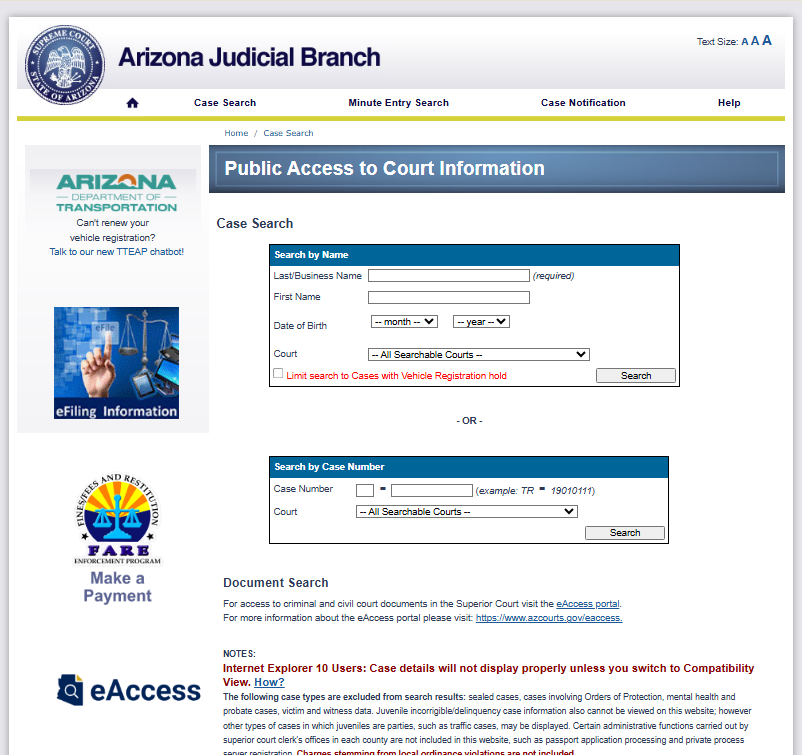
- Scroll down to the case number search area.
- Enter the case number in the provided field.
- Choose the relevant court or leave the default selection.
- Press Search to access case information.
Search by Party Name
Use a party name search when the case number is unknown.
- Open the Arizona public case search page using the link above.
- Find the section for searching by name.
- Enter the last name or business name (required field).
- Add the first name if available.
- Choose the date of birth to refine the results (optional).
- Select a court from the dropdown list or keep All Searchable Courts selected.
- Click the Search button to view matching court cases.
Court Docket Search
A docket search shows a timeline of filings, hearings, and motions.
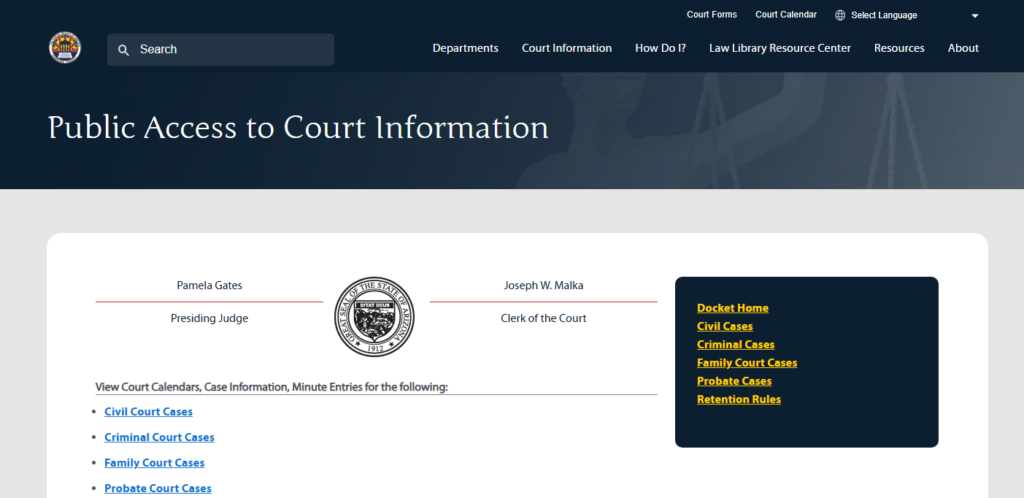
- Open the Case Search Page
Visit: https://www.superiorcourt.maricopa.gov/docket/civilcourtcases/casesearch.asp
- Search by Name
- Enter the Last Name and First Name of the individual.
- Click Search.
- Search by Business Name
- Enter the Business Name.
- Click Search.
- Search by Case Number
- Enter the Case Number for a direct search.
- Click Search.
- Additional Options
- Use links for Civil Cases, Criminal Cases, Family Court Cases, or Probate Cases for specific searches.
- Check Retention Rules for case record policies.
- View Results
- Search results will display relevant case details, including filings, hearings, and case status.
Where to View Records and Costs
| Portal / Source | View Records Cost | Download / Print Cost | Document Fees |
|---|---|---|---|
| Arizona Judicial Branch – Public Access | Free to view case summaries | $0.10–$0.25 per page | Free for viewing; downloading may have a fee |
| Arizona Judicial Branch – eAccess (full documents) | Case info visible | Fees per document | Fees vary; may require account creation |
| Pinal County Clerk of Superior Court – Request Copies | Free request form | $0.50 per page | $35 certification + possible research fees |
| In Person at Clerk’s Office (Florence, AZ) | Free review | $0.50–$1 per page | Certification extra |
How Pinal County Courts Handle Cases
Pinal County courts operate within Arizona’s judicial system, handling cases based on type and severity. Citizens can perform a Pinal County case search or court docket search to locate case information quickly.
Superior Court Overview
The Pinal County Superior Court is the state’s trial-level court for serious matters. It handles:
- Felony criminal cases, including violent crimes and major thefts
- Civil cases exceeding $10,000
- Family law matters such as divorce, child custody, and support
- Probate cases, including wills, estates, and guardianships
Superior Court judges are appointed or elected to manage both jury and non-jury trials. Case records here are generally accessible through the Arizona court system online portals, allowing for efficient court docket searches.
Key Points:
- Felonies and large civil cases go to the Superior Court.
- Jury trials for serious offenses are conducted here.
- Case status, hearing dates, and outcomes are available online.
Justice and Municipal Courts
Pinal County Justice Courts handle less severe matters.
These include:
- Misdemeanors like minor theft, traffic offenses, and public disturbances
- Civil cases up to $10,000
- Small claims disputes between individuals or businesses
- Evictions and landlord-tenant issues
Municipal courts focus mainly on violations of city ordinances, including traffic citations and code violations. Justice and municipal court proceedings are usually quicker than Superior Court trials and may not involve juries.
What to Expect:
- Justice Courts: 10–15 judges across Pinal County districts
- Municipal Courts: handle city-level cases only
- Records can be searched through online Pinal County case search tools
How Cases Are Divided
| Court Type | Case Types | Monetary Limit / Severity |
|---|---|---|
| Superior Court | Felonies, large civil, family, probate | >$10,000 / serious crimes |
| Justice Court | Misdemeanors, small civil, evictions | ≤$10,000 / minor crimes |
| Municipal Court | City ordinance violations | N/A |
Official Lookup Tools Explained
Pinal County court cases can be checked through several official tools, each serving a different purpose. Users have options ranging from online platforms to direct contact with the court, depending on how much detail they need.
Public Access Case Lookup
The Arizona Judicial Branch Public Access tool provides a quick way to search court dockets and cases. Users can perform a case number search for a specific case or a party name search to locate cases involving a particular individual or business. This tool is free and does not require an account, making it accessible for most casual inquiries. To use the tool, users first complete a captcha verification to confirm they are not a bot. Next, they select the type of search they want to conduct. Entering a case number retrieves that case’s current status, filing dates, and basic details from the court dockets. Searching by party name returns a list of cases involving the individual or entity entered. While the platform is convenient and immediate, it offers limited information, and some older or sealed cases may not appear in the results.
eAccess Portal
The eAccess portal expands the capabilities of public access by offering more detailed case information online. It allows registered users to view, download, and print a wide range of documents, including motions, judgments, and orders. Unlike public access, eAccess may require small fees for downloading certain files, but it provides access to information not available elsewhere. This portal supports both case number and party name searches, and it is especially useful for attorneys, researchers, or anyone needing complete case documentation. In addition to retrieving documents, users can track updates to ongoing cases. The portal ensures that official court documents are easily accessible from anywhere, making it a practical tool for detailed research or professional use.
Clerk of Superior Court Contact & In‑Person Search
For cases not fully available online, contacting the Pinal County Clerk of Superior Court directly is the most reliable option. This method is necessary for older cases, sealed records, or requests for certified copies. Users can reach out via phone, email, or by visiting the Clerk’s office in Florence, Arizona. Court staff assist with searches, ensuring users find the correct records. While the process may take longer than online searches, it guarantees access to complete and official information. Requests may require providing a case number, party name, or other identifying details, and processing times vary depending on the request’s complexity.
Locations & Contact
Finding the right Pinal County court and knowing how to contact it can save time and ensure your case is handled efficiently. Pinal County offers several court options depending on the type of case you need to file or review.
Pinal County Superior Court
The Pinal County Superior Court handles civil, criminal, family, and probate cases. This is the main judicial office for serious matters and complex legal proceedings.
- Address: 971 Jason Lopez Circle, Florence, AZ 85132
- Email: superiorclerk@pinalcountyaz.gov
- Phone: (520) 866‑5020
- Hours: Monday–Friday, 8:00 AM – 5:00 PM
- Cases Handled: Civil, Criminal, Family, Probate
Visitors should bring their case number or the names of the involved parties for faster service. The Superior Court also provides online case information for many active cases, making the Pinal County case search simpler.
Pinal County Justice Courts
Justice Courts in Pinal County handle traffic violations, misdemeanors, small claims, and civil disputes under $10,000. They operate in multiple locations:
| Court Location | Address | Phone | Cases Handled |
|---|---|---|---|
| Apache Junction | 575 N Idaho Rd, Apache Junction, AZ 85119 | (480) 474‑8771 | Traffic, Misdemeanor, Small Claims |
| Casa Grande | 200 E Florence Blvd, Casa Grande, AZ 85122 | (520) 421‑8600 | Traffic, Misdemeanor, Small Claims |
| Maricopa | 201 N Center St, Maricopa, AZ 85138 | (520) 568‑5100 | Traffic, Misdemeanor, Small Claims |
These local courthouses are ideal for routine matters and provide direct access to the court docket lookup for pending cases.
Municipal Courts in Pinal County
Certain cities maintain municipal courts for city ordinance violations and minor infractions. They typically handle:
- Traffic tickets
- Local code violations
- City ordinance disputes
Each court has its own hours and contact numbers, so checking before visiting is recommended.
(FAQs) About Case Lookup
Finding accurate information about Pinal County court cases can be straightforward with the right tools. The following FAQs cover common questions about court docket search, case number search, party name search, and performing an online lookup, helping users understand how to access case details efficiently.
Can I look up a Pinal County case online?
Yes, Pinal County court cases can be searched online using official court portals, allowing users to find case details quickly. These portals support court docket search, case number search, and party name search, making it easy to access civil, criminal, and traffic case information without visiting the courthouse. While most cases are available, certain filings may be restricted for privacy or ongoing proceedings, so results can vary depending on the case type.
What info do I need?
To perform an online lookup, users typically need key information about the case or the parties involved. Providing a case number offers the most accurate results, while entering the full or partial party name can also locate a case efficiently. Additional details, like hearing dates or docket numbers, can help narrow search results further. Accurate information is crucial because even minor errors, such as a misspelled name, may prevent the system from displaying the correct record.
Is the Pinal County court case search free?
Yes, the Pinal County online search tools are free to use for general case information. Users can perform an online lookup to view court filings, hearings, and case status without cost. However, requesting official copies of documents, transcripts, or certified records may involve a fee, as these are considered separate services. Understanding the difference between free online searches and paid document requests helps users manage expectations and avoid unnecessary delays.
Why can’t I find a case online?
There are several reasons a case may not appear in an online search. Recent filings may take some time to be added to the portal, and certain cases, such as juvenile or confidential civil matters, are restricted from public view. Errors in search details, like incorrect case numbers or misspelled party names, can also prevent results. Occasionally, technical issues or system maintenance may temporarily block access. When cases cannot be located online, contacting the Pinal County Clerk of Court can provide clarification and assistance.
What is a court docket?
A court docket is an official record that tracks all activity and filings in a case, serving as a timeline of events. Through a court docket search, users can see scheduled hearings, motions, filings, and judgments related to the case. The docket also lists parties involved and attorneys assigned, giving a clear view of case progress. Many online portals allow searches by case number, party name, or docket number, making it easier to monitor the status and history of a case efficiently.